
Scheduled Routes API Overview
Plan and optimize routes for vehicle fleets while respecting service time windows, capacity limits, traffic conditions, and driver breaks. Submit a problem, retrieve an optimized solution.
The API is engineered to enhance route planning and scheduling for vehicle fleets, addressing key constraints such as service time windows, capacity limits, and traffic conditions. By leveraging the API, businesses can significantly improve delivery efficiency, reduce operational costs, and save valuable time through optimized routing and scheduling solutions.
At its core, the API solves the Vehicle Routing Problem (VRP) with pickup and delivery. This problem involves calculating the most efficient routes for a fleet to visit multiple locations to perform pickup and delivery tasks while meeting constraints like time windows, vehicle capacity, and availability.
Additionally, the API supports dynamic schedule adjustments or re-optimization. If you need to modify an existing schedule, whether due to new orders, cancellations, or other changes, you can provide an updated picture of your schedule by specifying the job statuses and vehicle locations. The API will then re-optimize the schedule to reflect these changes, ensuring continuous efficiency in your operations.
For information on how to quickly get ready and start using the API, see Get Started. Several quick tutorials are also provided in the Tutorials section.
- v1.1 added support for route Templates.
- v1.2 added support for flexible vehicle capacity configuration.
Quickstart
Scheduled Routes is an asynchronous API: send a routing and scheduling problem, receive a reference ID, then poll that ID until the optimized solution is ready.
Send requests with an API access token in the Authorization header.
Use POST /raas/optimization with a problem payload.
Use GET /raas/optimization/{id} until the solution is returned.
Authentication
Requests use a bearer access token in the Authorization header. Replace YOUR_ACCESS_TOKEN with your generated API access token.
Authorization: Bearer YOUR_ACCESS_TOKENThe original source documentation contained sample bearer tokens and testing credentials. This WordPress-ready file keeps the examples and steps, but uses placeholders such as YOUR_ACCESS_TOKEN, YOUR_EMAIL, and YOUR_PASSWORD so credentials are not published accidentally.
API Lifecycle #
The API offers two key methods for managing routing and scheduling optimization:
- Optimization POST — Submit a routing and scheduling optimization problem. After submitting a POST request, you will receive a unique reference ID.
- Optimization GET — Retrieve the status of a submitted problem using the unique reference ID obtained from the POST method. If the optimization solution is ready, you can get the solution of the optimization problem.
How optimization works #
To solve a routing and scheduling optimization problem for a fleet of vehicles, follow these steps:
- Define the Problem. Begin by outlining your problem using the format specified in the Problem section.
- Submit the Problem. Use the POST method, as described in Get Started, to send your problem to the API.
- Retrieve the Solution. Access the solution to your optimization problem by using the GET method. The format of the solution is outlined in the Solution section.
To learn more about different terminologies used in the API, see the Glossary. To see a list of frequently asked questions, see the FAQ.
POST /raas/optimization #
Use this method to submit your routing and scheduling optimization problem to the API. Once an optimization POST request is successfully submitted, the API will return a unique reference ID in the acknowledgement response. Use this unique ID to retrieve the actual solution using the Optimization GET Method (see next section).
Example request (cURL)
An example for submitting an optimization problem using the POST method with a sample token and payload. In this example, the input problem is in a file called payload.json. Replace the sample token YOUR_ACCESS_TOKEN with your own token. The schema for the input problem is defined in the Problem section.
Response schema
After submitting the POST method, you will get a response message with the following format:
If the submission is successful, the status will be 202, with the message reading "accepted" and the id representing the unique reference number for the asynchronous operation. This ID is used to track the status of the operation and retrieve results later.
If there is an error, the status will indicate an error code, the id will be zero or empty, the message will be "failure", and the error will describe the error. For more details, refer to the POST status codes below.
Example request (Windows PowerShell)
The script below demonstrates how to make a POST request using a sample payload in Windows PowerShell. It assumes the input payload is stored in a file named payload.json, and the API access token is saved in token.txt. Upon execution, the generated ID is written to id.txt. To run PowerShell, simply type PowerShell in the start menu or command line.
POST status codes
| Code | Description | Additional notes |
|---|---|---|
| 202 | The request was accepted for processing. | A reference ID is returned which you can use with a GET request to retrieve the solution once ready. |
| 400 | Input validation failed (Bad Request). | Missing/invalid parameter or incorrect value type. Check input data and try again. |
| 403 | Unauthorized request. | This occurs when authentication fails. |
| 404 | Requested path not found. | This happens when an incorrect path is used. |
| 429 | Too many requests. | Rate limit exceeded (Queries per minute or quota hit). |
| 500 | Internal Service Error. | Issue on our end. Contact support@ddswireless.com. |
GET /raas/optimization/{id} #
Use this method to retrieve the optimized solution for the optimization tasks created using the Optimization POST Method. For this purpose, you need to specify the reference ID received from the POST method.
Example request (cURL)
An example for getting the output response of the API using the GET method with an ID. Replace ID in the URL with the ID you got from the POST method, and remember to use your own API access token.
For example, if ID is equal to 5, use this:
Response schema
If the solution is ready, statistics, routes, and unassigned will be populated based on the obtained solution. Otherwise, similar to the POST method, status, message, and error will show the status or error.
The schema for the output solution is defined in the Solution section.
Example request (Windows PowerShell)
The script below demonstrates how to make a GET request using an ID generated by the POST method. It assumes the ID is stored in a file named id.txt, and the API access token is saved in token.txt. Upon execution, the generated response is written to response.txt.
GET status codes
| Code | Description | Additional notes |
|---|---|---|
| 200 | The request has succeeded. | The solution is returned via statistics, routes, and unassigned. |
| 202 | The request was accepted but is not yet completed. | Status is pending. Check again later for solution readiness. |
| 400 | Could not process the request (Bad Request). | A feasible solution could not be generated due to invalid input or parameters. |
| 401 | Unauthorized request. | User authentication is required. No valid credentials received. |
| 500 | Internal service error. | Something went wrong on our side. Contact support@ddswireless.com. Fields like statistics, routes, and unassigned will be empty. |
Code formats
Use the same endpoint flow in your preferred format. These examples keep the request shape from the API reference and use publishing-safe placeholders.
Submit an optimization problem
cURL
curl -X POST "https://iq.scheduledroutes.ddswireless.net/raas/optimization" \
-H "Content-Type: application/json" \
-H "Authorization: Bearer YOUR_ACCESS_TOKEN" \
-d @payload.jsonPython
import json
import requests
url = "https://iq.scheduledroutes.ddswireless.net/raas/optimization"
headers = {
"Content-Type": "application/json",
"Authorization": "Bearer YOUR_ACCESS_TOKEN",
}
with open("payload.json", "r", encoding="utf-8") as payload_file:
payload = json.load(payload_file)
response = requests.post(url, headers=headers, json=payload, timeout=60)
response.raise_for_status()
print(response.json())PowerShell
$token = Get-Content token.txt -Raw
$headers = @{
    Authorization = "Bearer $token"
    "Content-Type" = "application/json"
}
$body = Get-Content payload.json -Raw
$response = Invoke-RestMethod -Uri "https://iq.scheduledroutes.ddswireless.net/raas/optimization" -Method Post -Headers $headers -Body $body
$response.id | Out-File -Encoding utf8 id.txt
Write-Output $responseRetrieve an optimization result
cURL
curl -X GET "https://iq.scheduledroutes.ddswireless.net/raas/optimization/ID" \
  -H "Content-Type: application/json" \
  -H "Authorization: Bearer YOUR_ACCESS_TOKEN"
Python
import requests

optimization_id = "ID"
url = f"https://iq.scheduledroutes.ddswireless.net/raas/optimization/{optimization_id}"
headers = {
    "Content-Type": "application/json",
    "Authorization": "Bearer YOUR_ACCESS_TOKEN",
}

response = requests.get(url, headers=headers, timeout=60)
response.raise_for_status()
print(response.json())Objects
The request object is centered on problem. The response object is centered on solution. The original field references, examples, diagrams, notes, and rules are preserved below.
Problem, Fleet / Vehicle / Shift / Break, Job / Task / Pickup / Delivery, Objective, and Configuration.
Solution, Route / Stop, Statistics, and Unassigned.
The Problem object #
The Problem entity represents a routing and scheduling problem. As shown in the figure below, it consists of four main components: fleet, jobs, objective, and configuration. Among these, fleet and jobs are mandatory, whereas objective and configuration are optional.

To specify a location or address in the API, use WGS84 Geo-coordinates with at least 5 decimal places for accuracy. For example, the address "1600 Amphitheatre Parkway, Mountain View, CA" has the coordinate latitude 37.423021 and longitude -122.083739. You can specify it as "location": {"lat": 37.423021, "lng": -122.083739} or as [37.423021, -122.083739].
The API uses ISO 8601 format for timestamps, including time zone information, to define local time for the area you require optimized routing and scheduling for. For example, 2024-07-31T14:45:30-08:00 represents July 31, 2024 at 2:45:30 PM PST, which is 8 hours behind Coordinated Universal Time (UTC).
In the input payload, you must use the same local time zone consistently. If multiple time zones are detected, the API will return an error. The times for scheduled stops in the output response will be provided in the same format as specified in the input payload. For example, if you specify 2024-07-31T14:45:30-08:00 in your input, the optimized route times in the output will also use -08:00; if you use +05:30 in the input, the output will use +05:30.
All optional attributes can be omitted in the payload. Empty arrays (e.g. []) can also be used for optional attributes that accept an array.
Ensure that no confidential or personal information is included in the data sent to the API. For example, avoid using real-life identifiers such as vehicle license plate numbers as the vehicle ID or job/task IDs.
Component summary
Specifies a list of vehicles along with associated information such as shift schedules, start and end locations, breaks, capacities, and skills. For each vehicle you can define one or multiple shift schedules (start/end times and locations), one or more breaks (time window, location, and duration), one or more capacity types with available units (multidimensional units such as volume, mass, or size), and one or more skills that enable it to perform certain jobs. For example, you might assign "welding machine" and "oxygen tank" as skills for one vehicle, and "lift" as a skill for another; if a job requires a lift, only the vehicle equipped with this skill will serve it. You can also set limits such as the maximum number of stops and the maximum travel distance (in miles).
Specifies a list of jobs to be served by the vehicles in the fleet. Each job can include a series of tasks, which may be only pickups, only deliveries, or both pickups and deliveries. For "visit" jobs where you need to visit a location to perform work (e.g. repairs, installing a modem), treat them as a delivery task with or without a capacity demand. For each task you can define attributes such as location, time windows, duration, capacity requirements, and necessary skills. If the optimizer cannot find a suitable ETA for a task within its specified time window, the task remains unassigned. For flexible or non-time-sensitive tasks, specify a broader time window (maximum span of 24 hours).
Determines the optimization objective or strategy. Currently three objectives are supported:
- Minimize Total Travel Time — the default strategy; minimizes the total travel time of the fleet while completing the specified jobs.
- Minimize Number of Routes — reduces the number of vehicles needed to complete the jobs. May lead to increased total travel time or greater workload on individual vehicles as a trade-off.
- Balance Workload among Routes — evenly distributes the workload among all vehicles in the fleet. This balance may result in increased total travel time.
Adjusts API settings or modifies default options. For example, you can specify whether to include a summary of optimization statistics (such as total travel time and distance) or a list of unassigned tasks in the API response.
Input request schema #
The schema of the input request to solve a route optimization problem is as follows. To submit a problem, this request must be included in the POST method as described in Get Started.
In a route optimization problem, a fleet of vehicles aims to serve a set of jobs efficiently. The schema above lets you define your fleet and your jobs. In the current version of the API, each job can be:
- Pickup tasks only — involve picking up items along the route and delivering them to the route's end location.
- Delivery tasks only — require delivering items that are loaded onto the vehicle at the beginning of the route.
- Pickup and delivery (P/D) tasks together — combine both actions, picking up something at one location and bringing it to another.
At least one job and one vehicle must be provided for the problem. For "visit" jobs that require going to a location (e.g. repairs, modem installations), consider them as delivery tasks, with or without a capacity requirement.
Additionally:
- If only the
pickupsobject is provided for a job, it is considered a pickup-only job. - If only the
deliveriesobject is provided for a job, it is considered a delivery-only job. - When both
pickupsanddeliveriesare provided, it is categorized as a pickup and delivery job.
The API does not support jobs with multiple pickups and multiple deliveries. In other words, for a "pickup and delivery" job:
- The
pickupsarray must contain only one pickup task. - The
deliveriesarray must contain only one delivery task.
The API also does not support jobs with no pickups and no deliveries. Classification rules:
- If only
pickupsis defined, the job is classified as a pickup-anchored job. - If only
deliveriesis defined, the job is classified as a delivery-anchored job. - If both pickup and delivery are defined, the anchor is the one that contains a service window.
- If both pickup and delivery have service windows, the job is considered pickup-anchored.
For each task, various attributes and constraints can be defined, such as capacity demands, service time windows, and required skills. Visit tasks, where you need to visit specific locations to perform tasks (e.g. repairs), can be seen as a specialized form of delivery task (with or without capacity requirements). Tasks are assigned to vehicles whose capacities or skill sets match the task's requirements. For example, if a task requires a lift or ladder, only vehicles equipped with a lift or ladder will be used to perform that task.
problem — field reference
problem Required Specifies the routing and scheduling optimization problem you would like to solve. It consists of the attributes below.
fleet
fleet Required Defines the fleet information. It is an array of fleet objects. Each fleet object consists of the following attributes:
A unique identifier for the vehicle.
An array of shift objects. Each shift object contains data for the shift start and end locations and times, as well as an array of break objects each containing break start and end locations and times. Multiple shift objects can be defined but they must be disjoint. Elements in each shift object:
The shift start time and start location.
time— optional. Specifies the shift start time. If not specified, defaults to 00:00:00 (midnight) of the current date.location— optional. The Geo-coordinate (latitude and longitude) of the start location. Specify as an array[A,B](A = latitude, B = longitude) or as{"lat": A,"lng": B}.
The shift end time and end location.
time— optional. Specifies the shift end time. If not specified, defaults to 23:59:00 of the current date.location— optional. The Geo-coordinate of the end location. Specify as[A,B]or{"lat": A,"lng": B}.
serviceWindow— required if breaks is used. The time period in which the break can happen.duration— required if breaks is used. An integer defining the duration of the break in seconds.location— optional. The location of the break, as[A,B]or{"lat": A,"lng": B}. If the location is omitted the break is "floating", meaning it can be taken anywhere at the convenience of the driver.
Example — shifts
An array of capacity objects. Each capacity object is a key-value object defined with the following keys:
name— required. A string specifying the name of the capacity type (e.g. "wheelchair", "box", "seat", "bin").units— required. An integer specifying the available units of the capacity type.
For example, if a vehicle has a capacity for 2 seats and 20 packages, you can define its capacity as follows:
A list of vehicle skills or equipment, each represented by an arbitrary string specific to your application. This allows you to customize the capabilities of your vehicles to match the requirements of the jobs they serve. Example: "skills": ["lift","fridge","oxygen tank"]
Specifies constraints applied to the vehicle.
maxDistance— optional. An integer number specifying the maximum distance limitation for the vehicle. The distance is interpreted in the units selected by theunitsconfiguration setting: kilometers when"metric"(the default) or miles when"imperial"maxStops— optional. An integer defining the maximum number of stops (pickup or delivery tasks) the vehicle can serve in one shift.lifoDepth— optional. An integer defining the LIFO (Last In First Out) depth of the vehicle.
Specifies the last known location of the vehicle at the specified time. This information is crucial for re-optimizing an ongoing route to account for new changes such as broken vehicles, late jobs, new jobs, or canceled jobs. When re-optimizing an existing schedule, you need to provide the location of all involved vehicles.
A unique identifier used to define a route template. The API supports the concept of "Route Templates", which allow you to define the specifications for a particular vehicle type and request the API to generate a specific number of such vehicles for optimization. A route template contains the same information as a route or vehicle, but you can specify a "size" parameter called maxInstances for it. For instance, suppose you have 100 vehicles. You might define 2 or 3 route templates:
- Shift 6am–6pm, capacity 4, size = 60
- Shift 1pm–1am, capacity 4, size = 50
- Shift 6am–8pm, capacity 10, size = 35
This means the API can automatically instantiate up to 60 vehicles using template 1 as needed, 5 with template 2, and 35 with template 3.
If routeTemplateId is provided, maxInstances specifies how many route templates should be generated based on the specified route template.
- Exactly one of
idorrouteTemplateIdmust be used, never both. idandmaxInstancescannot be used together.- If both
routeTemplateIdandmaxInstancesare provided, the API uses the route template model to generate routes.
jobs
jobs At least one required An array of job objects. Each job object has the following attributes:
A unique identifier for the job.
An array of Task Objects, each defining a pickup task.
An array of Task Objects, each defining a delivery (or drop-off) task.
- The API does not support jobs with multiple pickups and multiple deliveries.
- The API does not support jobs with no pickups and no deliveries.
- If only
pickupsis specified, the job is classified as a pickup-anchored job. - If only
deliveriesis specified, the job is classified as a delivery-anchored job. - If a job has both a pickup and a delivery, the anchor is determined by the task that defines a service window.
- If both tasks have service windows, the job is treated as a pickup-anchored job.
The Task Object
Each Task Object consists of the following attributes:
A unique identifier for the task.
A key-value object that specifies the Geo-coordinates (latitude and longitude) of the location where the task must be performed. Specify as an array [A,B] (A = latitude, B = longitude) or as {"lat": A,"lng": B}.
Specifies the service time window for performing the task. The service window is an array with this format: [A, B] where A and B are the start and end times of the service time window. Alternatively, a service window can be specified as a key-value object: {"start": A, "end": B}. The API will attempt to produce an ETA within the specified service window for that task. If this is not possible, the task will be listed as unassigned. In other words, times “A” and “B” define the earliest and latest times by which a task must be completed by a vehicle. For tasks that are flexible or not time-sensitive, use an arbitrarily large window (max 24 hours) to give the API more flexibility in scheduling other tasks. The current version of the API supports only one service window for each task. For pickups only and deliveries only tasks, the service window is required. Example:
Specifies the duration of the task in seconds. It can be either an integer or a key-value object with the following keys:
fixed— the fixed duration (seconds) for the job (e.g. for finding parking, lowering the lift).service— the service duration (seconds) for doing the job.
An array of capacity demands for the task. The structure of each demand object is identical to that of the capacity object in the fleet entity. Each capacity item consists of a name (string) and its units (integer). The specified names must match those defined in the capacity object of the fleet entity. For example, if a job requires capacity for two seats and 20 packages:
An array of skills or equipment required to perform the task, each represented by an arbitrary string specific to your application. Only vehicles whose skill set matches the skill set of the task will be considered for performing the task. These skills are matched to the skills defined in the fleet entity. Example: "skills": ["lift", "ladder", "welding machine"]
A string specifying the status of the task: pending, in_progress, or performed. This is crucial for re-optimizing an ongoing route. For new tasks or tasks not yet performed, set it to pending. If the task is already performed, set it to performed. If the vehicle has already arrived at the location and the task is underway, set it to in_progress. The default value is pending. Example: "status": "pending"
Specifies the assigned vehicle ID for already-scheduled tasks. This is crucial for re-optimizing an ongoing route. The default value is zero. For new tasks, set it to zero. For existing tasks already assigned to a vehicle, set this attribute to the assigned vehicle ID. Example: "vehicleId": 12
Specifies the current ETA (estimated time of arrival) for already-scheduled jobs. This is crucial for re-optimizing an ongoing route. The default value is 0. For new or performed tasks, set it to 0; for existing pending tasks, set it to the existing ETA. Example: "eta": "2021-07-04T12:13:00-08:00"
objective
objective integer Optional Specifies the optimization objective (strategy). Default is 1.
Alternatively, a string naming a custom optimization strategy configured for your account can be provided.
| Value | Strategy |
|---|---|
1 | Minimize Total Travel Time (default) |
2 | Minimize Number of Routes |
3 | Balance Workload Among Routes |
Example: "objective": 1
configuration
configuration Optional Used to specify additional settings or configurations.
Specifies the type of output polyline returned for each scheduled route. One of none, plain, encoded. If none, no polylines are included. If plain, an ordered list of intersections to travel between each pair of consecutive stops is returned. If encoded, the polyline is compressed into a string format you can provide to third-party navigation APIs such as Google Maps for turn-by-turn instructions. The default value is none.
A flag that determines whether unassigned tasks must be included in the output response. Default is False. If for any reason the API cannot assign a task to a route, it will list it as unassigned.
A flag that determines whether the optimization statistics must be included in the output solution. Default is True.
Specifies the units for the output statistics and the fleet limits. Either metric or imperial. The default value is metric.
Defines the maximum onboard time for all jobs. It is defined by a static table in which each row is an array containing three time values (in minutes): [A, B, C]. This means if the direct travel time for a job is between A and B, the maximum onboard time equals "rideTime + C". For example, a simple table with two rows: "maxRideTable":[[0, 10, 30], [11, 20, 40]]. Default is [[0, 300, 720]]. Overlap and gaps are not allowed in this table, and the granularity is minutes. Also, the granularity is minutes and each value in the table must not exceed 1440.
Controls how strictly the optimization engine honors previously assigned (locked) jobs during re-optimization. It is a string with three possible modes: "full", "order", or "vehicle". Default is "full".
When set to "full" (the default), every job already assigned to a vehicle keeps both its vehicle and its exact ETA. The optimization engine will only optimize and assign new jobs that do not already have a vehicle assignment.
When set to "order", locked jobs keep their vehicle and their relative ETA order on that vehicle, but their exact times are released so the engine can shift the schedule to accommodate new jobs.
When set to "vehicle", locked jobs keep only their vehicle assignment; their exact times and their relative order may both change. For example, a job originally scheduled for 8:00 AM may be rescheduled to a different time during a 10:00 AM re-optimization, but it will remain on its assigned vehicle.
For backward compatibility, boolean values are still accepted: true is equivalent to "full" and false is equivalent to "vehicle".
Vehicle capacity definitions can be named and then used in the fleet section. This is particularly useful for complex definitions when a vehicle can have many configurations. For example, if a vehicle can fit either (10 'ambulatory' and 0 'wheelchair' passengers) OR (8 'ambulatory' and 1 'wheelchair' passengers) you could define "vehicleCapacities":{"flexBus": [[{"name": "ambulatory", "units": 10}], [{"name": "ambulatory", "units": 8},{"name":"wheelchair", "units": 1}]]}. Then in the fleet property you can use fleet[<index>].capacities: "flexBus" for each flexBus in the fleet. Named vehicle capacities can also be saved in your personal customer profile, where they become available for use without having to define them in the configuration section. If a named vehicle capacity is present in both your personal profile and the payload, the definition in the payload takes precedence.
The freeze window length in minutes (maximum 1980). A freeze window is a concept that only applies to same-day optimization and is useful when re-optimizing a problem. For example, if you have already optimized a problem but want to make changes in the middle of the day, you could re-send the problem (with appropriate task.status to reflect what has already been done) and set a freeze window of 60 minutes. This instructs the optimizer that the time period extending 60 minutes from "now" is off-limits: no tasks can be added to or removed from any route within the freeze window.
An array of capacity types that are subject to the LIFO (Last In, First Out) constraint. Example: "lifoConstrainedCapacities": ['wheelchair', 'scooter']
Example — configuration
version
version Optional Specifies the version of the API. Default is 1.0.
To see various examples of a Problem and learn how to use the API in different use cases (e.g. re-optimization), see Tutorials.
1. Unique identifiers. All jobs must have unique IDs. All tasks must have unique IDs. All vehicles must have unique IDs. A job may share its ID with a task or vehicle — this is allowed.
2. Time constraints. Each problem may include multiple time-related elements, such as task service windows and vehicle shifts. The API determines the minimum time across all values. For example, if the minimum is 2024-09-18T04:32:00-08:00, the maximum is computed by finding midnight on the day the minimum occurs and adding 33 hours to that timestamp. So in this example, the max allowed time is 2024-09-19T09:00:00-08:00. If any time in the problem (e.g. vehicle shift or task window) exceeds this, the API will return a 400 error.
The Solution object #
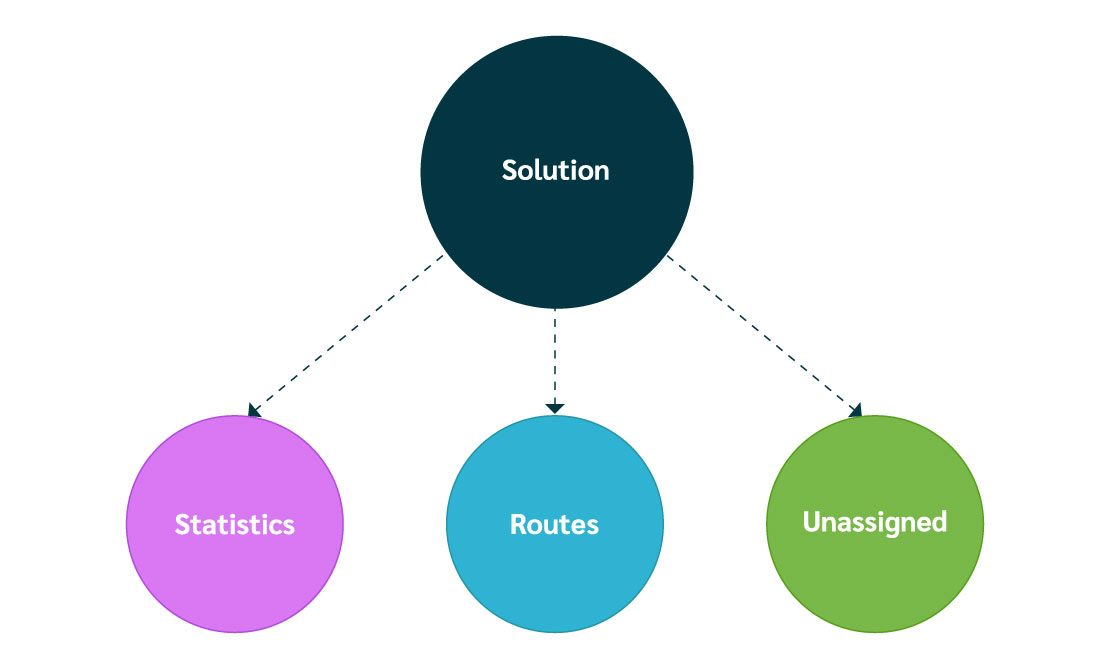
Once you submit a problem via the POST method, you receive a unique reference ID. Use this reference ID with the GET method to retrieve the status of the submitted problem. If the optimization solution is ready, you can access it in the solution entity of the response. As shown in the figure below, the solution entity is composed of three main parts:
Includes various metrics that provide an overview of the entire solution across all routes, allowing you to evaluate its effectiveness (for example, the total travel distance for all optimized routes). By analyzing these statistics you can measure the quality and efficiency of the produced solution.
Contains the optimized routes along with their stops and estimated times of arrival (ETA). It can also include the polyline of each route.
Contains the list of unassigned tasks. If the API cannot assign a task to a route during optimization, it is listed as unassigned. It can include reasons for why each task remains unassigned, providing insight into the constraints or issues that prevented assignment.
Output solution schema #
The template of the solution provided in the output response of the API is as follows:
The solution entity represents the solution of the route optimization problem and consists of the attributes described below.
statistics
Contains the statistics of the entire solution. It consists of the following properties:
totalDistance— the total distance traveled by the entire fleet, including the distance from each vehicle's start location to its end location.revenueDistance— the total revenue distance traveled by the entire fleet, including the distance from the first stop to the last stop for each vehicle. It does not include the distance from the vehicle's start location to the first stop or from the last stop to the vehicle's end location.
used— the number of used vehicles in the solution to perform the scheduled jobs/tasks.unused— the number of unused vehicles.
scheduledTasks— the number of scheduled tasks.unassignedTasks— the number of unassigned tasks.
totalHours— the total travel hours for the entire fleet, including time spent traveling from each vehicle's start location to its end location.revenueHours— the total revenue hours traveled by the entire fleet, including the time taken from the first stop to the last stop for each vehicle. It does not include time traveling from the vehicle's start location to the first stop or from the last stop to the vehicle's end location.
Example — statistics
routes
Provides an array of the scheduled route for each vehicle. Each scheduled route contains:
The ID of the assigned vehicle.
An array of shift objects. The API supports multiple shifts for each vehicle. Each shift object consists of:
index— the index of the shift (integer).stops— an array of all stops to be performed by the vehicle on this shift.
Each stop has the following properties:
ordinal— the stop's position within the vehicle schedule, represented by its index (integer).jobId— the job ID related to this stop (integer).taskId— the task ID related to this stop (integer).type— the type of task performed at this stop ("pickup" or "delivery").location— the Geo-coordinates of the location of the stop.eta— the estimated time of arrival for the stop (in the same time zone as the input payload).timeToNext— the driving time to the next stop. For example, if you drop off a passenger at 9:00am and your next job is at 10:00, this tells you the driving time from the current stop to the next stop is 20 mins.distanceToNext— the driving distance to the next stop. Depending on the chosen units in the configuration, this can represent miles or meters.waitTime— how long the driver should wait at the next stop if they start driving now.polyline— the polyline connecting the stop to its preceding stop. If "plain" is specified in the configuration, the polyline is an ordered list of intersections to travel between the preceding stop and the current stop. If "encoded" is specified, the plain polyline is encoded and returned as an encoded string.break— if the scheduled stop is for a break, it represents the ID of the break. Other stops do not have this element. The API does not enforce that breaks (or jobs) be listed in chronological order.
Example — routes
unassigned
The optional unassigned task list is populated with tasks which cannot be assigned due to specific constraints. Each item consists of a job ID, a task ID, and possible unassignment reasons (a code plus a description):
job— the job ID (integer) of the unassigned task.task— the ID (integer) of the unassigned task.
An array of possible reasons for the unassigned tasks.
code— the code (integer) of the possible reason.description— the description (string) of the possible reason.
Errors and Status Codes #
As described in Get Started, the API supports both POST and GET methods. Depending on the method, it returns a status code in the output response. Below are the descriptions of the status codes for these two methods.
POST status codes
| Code | Description | Additional notes |
|---|---|---|
| 202 | The request was accepted for processing. | A reference ID is returned which can be used with a GET request to retrieve the solution once it is ready. |
| 400 | Input validation failed (Bad Request). | One or more parameters are missing, invalid, or incorrectly typed. Please correct the input data and resubmit the request. |
| 403 | Invalid authentication credentials or insufficient permissions. | The request was understood, but the client is not authorized due to missing or incorrect permissions. |
| 404 | Requested path not found. | This error occurs when the requested URL path does not match any valid endpoint. |
| 429 | Too many requests. | The QPM (Queries Per Minute) or request quota has been exceeded. The client must slow down request frequency. |
| 500 | Internal Service error. | There was a server-side issue with the API. Contact support@ddswireless.com for assistance. |
GET status codes
| Code | Description | Additional notes |
|---|---|---|
| 200 | The request has succeeded. | The problem was solved successfully. Results are returned via statistics, routes, and unassigned. |
| 202 | The request was accepted but it is not completed yet (pending status). | Solution is not ready yet. You will need to check back later. |
| 400 | Could not process the request (Bad Request). | A feasible solution could not be generated for the provided locations or parameters. |
| 401 | Unauthorized request. | The request requires user authentication. The server did not receive proper credentials. |
| 500 | Internal Service error. | There was a server-side issue with our API. Please contact support@ddswireless.com. The fields statistics, routes, and unassigned will be empty. |
Guides / Tutorials #
Here you will find various examples demonstrating how to use the API. The API primarily supports two main use cases:
- Planning and Scheduling — generates an optimized schedule for a fleet's tours, considering constraints related to jobs and vehicles.
- Re-optimization — modifies an existing or ongoing schedule to reflect changes such as new jobs, cancellations, or broken vehicles.
Explore the examples below to see how these use cases are implemented:
- Example 1 — Planning a simple pickup and delivery (drop-off) scenario.
- Example 2 — A simple re-optimization scenario for adding new jobs to an existing schedule.
- Example 3 — Re-optimization with cancelled jobs.
- Example 4 — Re-optimization with broken vehicles.
The locations mentioned in the following examples are fictional and randomly generated, and do not correspond to real places.
Planning a simple pickup and delivery scenario
A fleet of 2 vehicles serving 3 pickup and delivery jobs, optimized to minimize total travel time.
In this example, our fleet consists of 2 vehicles and we have 3 pickup and delivery jobs that must be served by the two vehicles. Here are the details for each vehicle:
Vehicle 1
- Shift details: The shift starts on 2024-10-01 at 8:00 AM PST from location (50.67293, -120.34195) and ends at 6:00 PM at the same location. The time zone is PST, so the start time is recorded as
2024-10-01T08:00:00-08:00and the end time as2024-10-01T18:00:00-08:00. - Breaks: Two breaks, each lasting 15 minutes. First break between 10:00 AM and 10:30 AM at location (50.6531, -120.38393); second break between 2:00 PM and 2:30 PM at location (50.6531, -120.38393).
- Capacity: 15 seats and 5 cargo.
- Skills: Equipped with a lift and air conditioning.
Vehicle 2
- Shift details: The shift starts on 2024-10-01 at 8:00 AM PST from location (50.7117, -120.39286) and ends at 6:00 PM at location (50.67698, -120.32012).
- Breaks: One 15-minute break between 11:00 AM and 11:30 AM at location (50.6531, -120.38393).
- Capacity: 10 seats and 8 cargo.
- Skills: Equipped with a lift only.
We also have three "pickup and delivery" jobs in Kamloops, BC, Canada. Here are the details of each job:
Job 1
- Pickup: Location (50.65391, -120.37365). Service window 9:00 AM to 9:30 AM (the job is pickup-anchored, and the pickup must be performed within this window). Duration 10 minutes. Requirements: 1 seat, 2 cargo, vehicle equipped with a lift.
- Delivery: Location (50.69409, -120.35425). Duration 5 minutes.
Job 2
- Pickup: Location (50.70816, -120.37796). Duration 5 minutes. Requirements: 1 seat, vehicle equipped with both a lift and air conditioning.
- Delivery: Location (50.66559, -120.36924). Service window 12:45 PM to 1:30 PM (the job is delivery-anchored, and the delivery must be performed within this window). Duration 5 minutes.
Job 3
- Pickup: Location (50.70393, -120.37263). Service window 2:00 PM to 2:30 PM (the job is pickup-anchored). Duration 10 minutes. Requirements: 1 seat, 3 cargo, no specific equipment required.
- Delivery: Location (50.69028, -120.39028). Duration 5 minutes.
Our goal is to assign these jobs to the defined vehicles so that the total travel time is minimized. In other words, our optimization objective is equal to 1. The input problem is as follows:
Input problem (payload)
After submitting this problem using the POST method (as described in Get Started), we get the following solution using the GET method:
Output solution
Adding new jobs to an existing schedule
Re-optimize a partially executed schedule at 11:36:34 to incorporate a newly received job.
Now consider the previous example. Assume that you have started performing the produced schedule since the morning, and now it is 11:36:34, and you get a new job order as follows:
Job 4 (a new job)
- Pickup: Location (50.65187, -120.40052). Service window 15:45 to 16:15 (a pickup-anchored job). Duration 15 minutes. Requirements: 1 seat, 1 cargo.
- Delivery: Location (50.69262, -120.35412). Duration 10 minutes.
You have already performed Job 1, but Job 2 and Job 3 are still in progress with the following details:
- Job 1: performed.
- Job 2: in progress. Pickup — current vehicle ID 1, ETA 10:30. Delivery — current vehicle ID 1, ETA 12:45.
- Job 3: in progress. Pickup — current vehicle ID 2, ETA 14:00. Delivery — current vehicle ID 2, ETA 14:29.
Since Job 2 and Job 3 are in progress, they have an associated vehicle ID and ETA. To re-optimize your schedule to include the new job (Job 4), provide an updated view of your current schedule through the API. This includes details about your jobs as follows:
- Job 1: already performed, so set the status of the pickup and delivery tasks to
"status":"performed". You do not need to provide the current vehicle ID and ETA for these tasks as they are already performed and cannot be changed. - Job 2: still in progress and assigned to vehicle 1 with pickup ETA = 10:30 and delivery ETA = 12:45. Include
"status": "in_progress","vehicleId": 1, and the correspondingetafor its pickup and delivery tasks. - Job 3: still in progress and assigned to vehicle 2 with pickup ETA = 14:00 and delivery ETA = 14:29. Include
"status": "in_progress","vehicleId": 2, and the correspondingetafor its pickup and delivery tasks. - Job 4: a new job, not scheduled yet, so set its status to
"status":"pending". You do not need to specify a vehicle ID or ETA. After re-optimization you will get a vehicle ID and an ETA for each task of this job.
You also need to provide the last known location of your vehicles so the API has an updated picture of your current schedule. Suppose the last known locations at 11:36:34 (the time we want to re-optimize) are: Vehicle 1: (50.66692, -120.35293) and Vehicle 2: (50.65324, -120.37398). Include a lastKnownLocation object with the location and time for each vehicle.
To do re-optimization, you can now submit your new optimization problem as follows:
Re-optimization payload
Re-optimization with cancelled jobs
Remove cancelled jobs from an in-place schedule and re-optimize the remainder.
If you've submitted an optimization problem for a set of jobs and already have a schedule in place, but some jobs have been cancelled, you can re-optimize your schedule by removing the cancelled jobs from the problem. To do this, you'll need to:
- Provide an updated picture of your remaining jobs and the last known locations of your vehicles, similar to Example 2.
- Create and submit a revised problem reflecting these changes.
Once submitted, you will receive a new schedule that accounts for the updated jobs and fleet status.
Re-optimization with broken vehicles
Reassign the work of a vehicle that has broken down mid-shift.
Suppose it's 8:00 AM and you use the API to generate an optimized schedule for your jobs with 10 vehicles. You begin executing the schedule, but at 9:14 AM you learn that one of your vehicles has broken down and can no longer perform its assigned jobs. To re-optimize the schedule, follow these steps:
- Update fleet information. Remove the broken vehicle from your fleet object.
- Provide vehicle locations. Submit the last known locations of the remaining vehicles, similar to Example 2.
- Update task status. Provide the status of all tasks: specify which tasks are already performed, which are in progress, and which are new or pending. For tasks in progress, include the associated vehicle ID and ETA.
- Handle tasks for the broken vehicle. Change the status of all tasks previously assigned to the broken vehicle to
"pending". This allows the API to reassign them to other available vehicles and recalculate their ETAs. - Submit for re-optimization. Submit the updated problem to the API for a new schedule optimization.
How to test Scheduled Routes #
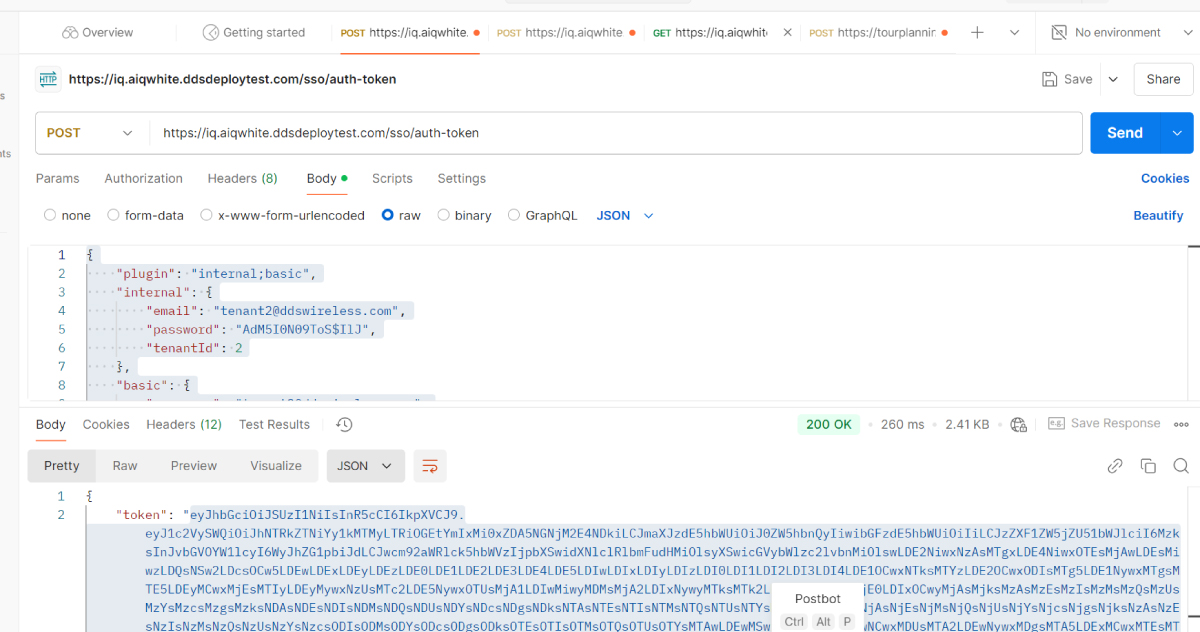
Step 1 — Generate an access token
First send a POST request to the following URL to get an access token, using the credentials below.
POST request body for Vancouver (Tenant 2):
POST request body for Finland (Tenant 3):
Then, copy the generated token. Here is a screenshot of this step:
Step 2 — Send an input payload (optimization problem) to the API
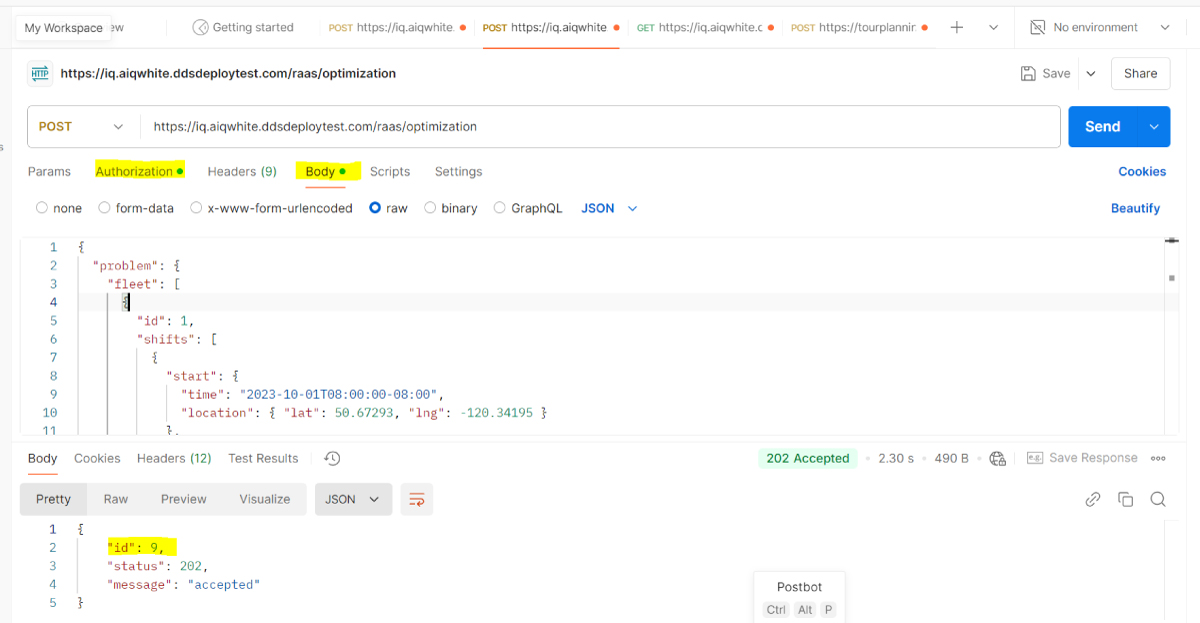
To send an input payload to the API and get a reference ID, put the generated token in the "Authorization" part of the following POST request, and put the input payload in the "Body" part of the request.
A sample input payload:
If the POST method is successful, you get a reference ID by which you can retrieve the output response via the GET method. Below is a screenshot of this step:
Step 3 — Get the output response of the API call
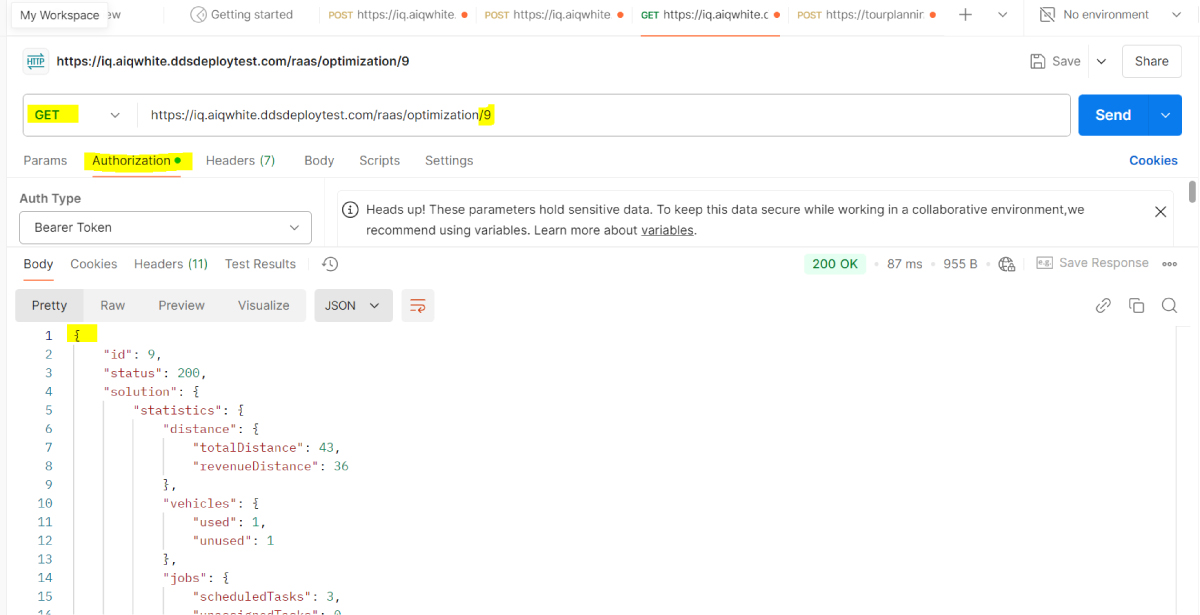
To get the output response using the received reference ID, put the access token in the "Authorization" part of the following GET request, and include the reference ID in the URL.
Here is a screenshot of this step:
Glossary #
| Term | Definition |
|---|---|
problem | A routing and scheduling optimization problem to be solved by the API. |
solution | The solution of the routing and scheduling optimization problem provided by the API. |
fleet | A fleet specifies a list of vehicle types and their information. |
job | A list of delivery or pickup and delivery tasks that must be performed by a specific vehicle. |
task | A task is part of a job and is to be performed at a specific location and time. |
break | An attribute to define one or multiple break times for drivers at specific locations. |
demand | Task capacity requirement represented in multidimensional units (e.g., volume, mass). |
duration | The amount of time used for performing a task or a break. |
shifts | Defines vehicle schedules, including start/end times, locations, and potential breaks. |
delivery | A job task for delivering something loaded earlier in the tour. |
pickup and delivery | A job where both pickup and delivery places are specified. |
skills | Vehicle skills needed to serve certain tasks (e.g., equipment, size requirements). |
service window | A time range within which a task must be completed. |
start/end location | Where a vehicle departs from or returns to (e.g., depot or garage). |
start/end time | Defines timing for shifts, breaks, departures, or tasks. |
location | The latitude and longitude of an address in WGS84 format. |
re-optimization | Updating an active schedule due to changes like new/cancelled orders. |
ID (or id) | A unique identifier for a job, task, or vehicle. |
VRP | Vehicle Routing Problem. |
CVRP | Capacitated Vehicle Routing Problem. |
PDP | Pickup and Delivery Problem. |
limits | Constraints applied to a vehicle type. |
objective | The optimization strategy used to solve the problem. |
statistics | Statistics of the optimized routes returned in the solution. |
stop | A list of activities performed at a specific time/place along a route. |
unassigned jobs/tasks | Jobs/tasks that could not be assigned to a route. |
ETA | Estimated Time of Arrival. Provided for all stops in the output. |
polyline | A connected line path representing a route on the map. |
encoded polyline | A compressed string version of a polyline, used to minimize data size (e.g., _kv~uF|y~wGdkZ~gAx|]t@). |
FAQ #
| Question | Answer |
|---|---|
| Does the API support solving Pickup and Delivery Problem (PDP)? | Yes, see the Tutorials section for the detailed explanation. |
| Does the API support open PDP? | Yes, you can define arbitrary start and end locations for each vehicle in your fleet. |
| Does the API utilize real-time traffic data? | Yes, it uses both historical and real-time traffic data. |
| Can I define vehicle shift timings, start/end locations, and breaks? | Yes, see the fleet object of the Problem page. |
| Can we define multiple arbitrary capacity types for vehicles? | Yes, the capacity attribute in the fleet object supports multiple dimensions like weight, volume, and quantity. |
| Can we specify the max number of tasks per vehicle? | Yes, this can be defined using the fleet object of the Problem page. |
| Does the API support multiple breaks per vehicle? | Yes, supported via the fleet object in the Problem page. |
| Does the API support pickups, deliveries, or both? | Yes, see the jobs object in the Problem documentation. |
| Can I specify task duration? | Yes, use the duration attribute in the jobs object of the Problem. |
| Can I define arbitrary task capacity demands? | Yes, supported via the jobs object in the Problem definition. |
| Can we define a service time window per task? | Yes, specify earliest and latest start times using time windows in jobs object. |
| Can I define skills or traits required for each task? | Yes, traits are supported in the jobs object and help match tasks to qualified vehicles or drivers. |
| Does the API support re-optimization for ongoing routes? | Yes, see Tutorials for how to re-optimize in-progress solutions. |
| Does the API provide route and schedule statistics? | Yes, see Solution for detailed stats like travel time, distance, and unassigned jobs. |
| Does the API explain why tasks were unassigned? | Yes, see Solution for reasons behind unassigned jobs. |
| Does the API return estimated arrival times? | Yes, see Solution for ETAs per task. |
| Can the API cluster jobs by location? | Yes, clustering is supported to improve route efficiency. |
| Can I choose different optimization objectives? | Yes. Options include: Minimize Total Travel Time, Minimize Number of Routes, and Balance Workload among Routes. See Problem for more details. |