

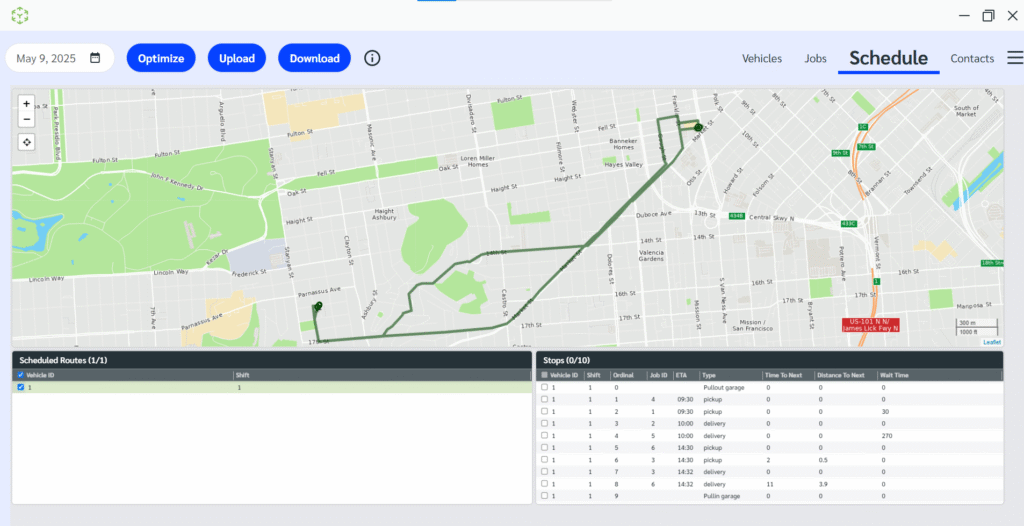
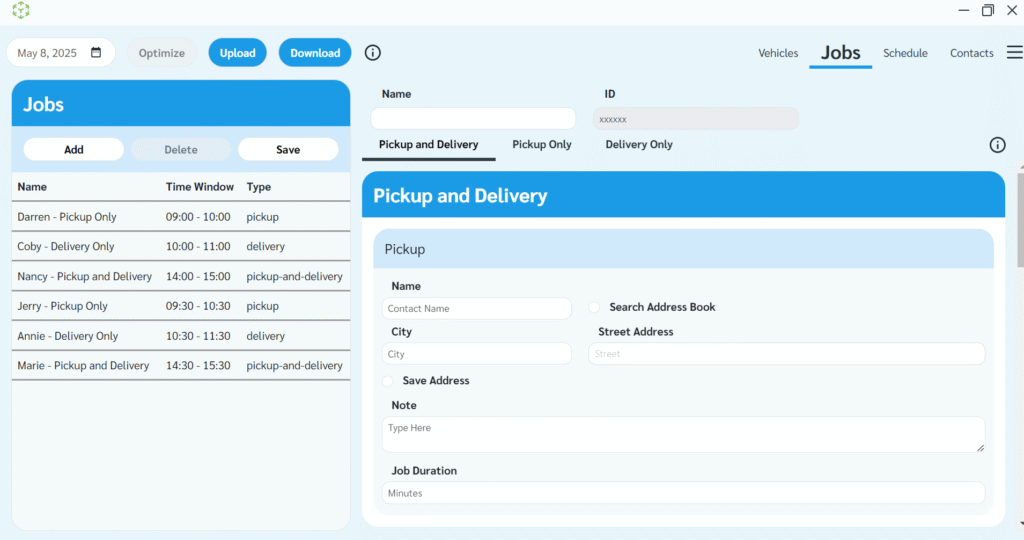
The Scheduled Routes desktop client is now available for both Windows and Mac. Experience faster planning, smarter scheduling, and better visibility—right from your desktop.
Download it today and get started.
Input jobs. Get optimized schedules.
No devs, no spreadsheets—just easy address entry and one-click scheduling. View your routes on a map and download ready-to-go driver manifests.
✔ Optimize routes instantly
✔ Visualize on a map
✔ Download or print manifests
Set up your fleet in minutes.
Add vehicles, shifts, limits, and capacities with zero fuss. Import from Excel or enter manually—no tech skills required.
✔ Add/edit vehicles fast
✔ Define shifts and capacities
✔ Save and reuse setup
Set up your fleet in minutes.
Add vehicles, shifts, limits, and capacities with zero fuss. Import from Excel or enter manually—no tech skills required.
✔ Add/edit vehicles fast
✔ Define shifts and capacities
✔ Save and reuse setup

Reduce transit times and fuel consumption through eco-efficient route planning and real-time fleet insights, which reduce costs and carbon footprint.

Make every delivery faster and every customer happier with precision logistics, adaptive routing, and real-time service visibility.

Smarter routing for waste, transit, and emergency response—enhancing service delivery, reducing delays, and making better use of fleet resources.

Simplify technician and fleet routing with intelligent tools that optimize schedules and enhance the customer experience.
Set precise delivery hours to meet the Service Level Agreement (SLA).
Optimize routes by considering the specific demands for every order.
Optimize routes considering order demands and delivery times to avoid delays.
Stay compliant by incorporating driver break times into route planning.
Ensure vehicles are neither underloaded nor overloaded. Plan for optimal capacity.
Optimize vehicles for: shortest distance, lowest cost, or quickest ETA.
Scheduled Routes is a high-performance routing and scheduling service that turns your jobs, tasks, and fleet details into efficient routes in seconds. It handles up to 50,000 stops per optimization and adapts to real-time conditions to cut travel time, reduce fuel usage, and improve on-time performance. You can use it through the Client App or integrate it into your system through the API or SDKs.
The Client App is a simple desktop tool that lets you plan and optimize routes without any technical setup. You can enter or import your jobs and fleet details, run optimizations instantly, and make quick adjustments when things change. It is designed for smaller to medium-sized businesses and teams that want fast results without technical integration into existing fleet management software.
The API is a cloud service that developers and enterprises can embed into their TMS, WMS, FSM, ERP, or custom fleet management applications. It delivers optimized routes, schedules, and real-time re-optimization directly into your software. SDKs help teams integrate faster by providing ready-made components for common development environments.
It should typically take just a week to formulate and fine-tune the routing objective function to match your specific use case and business objectives.
Yes, Scheduled Routes incorporates real-time traffic data to calculate distances and suggest the most efficient routes.
Scheduled Routes can handle 50,000+ delivery points in a single route optimization scenario.
Yes. Our route solver seamlessly integrates your live tracking data, enabling the insertion of on-demand tasks and orders into ongoing routes with minimal disruption to the overall itinerary.
Yes, we offer a trial evaluation where you can process your data and constraints to verify the quality of routes our engine generates.